Monday, March 14, 2016

How does Client Online status in ConfigMgr 1602 work

Hey guys, you all excited to get your hands dirty with COnfigMgr 1602 ? Well, I was able to get the upgrade package by running the powershell script(EnableupdateRing Powershell Script) available here

Right after running the powershell script I launched Configuration Manager Service Manager and restarted SMS_DMP_Downloader under components. Then the upgrade package was available under Administration\Overview\Cloud Services\Updates and Servicing . Right clicked on it to run the pre-requisite check and started upgrade through right click menu. I am not going to talk about the upgrade process in detail, since there are many article explaining that in detail.

One cool feature that I noticed is, we could see if a computer is online or offline in console. There is this green check mark on the device icon if the client is online. The Icon for offline computers remains the same.


I was really surprised to see this change for real and It also made me to think that if the client are going to send it status to MP frequently and ConfigMgr is to process all these request and store is in DB, It would actually increase the load on both the network and site server / systems. So I decided to check if there are places where this communication activity is recorded. I found quite interesting stuff there..

Quoted from Microsoft post

A new status for clients is available for monitoring if a computer is online or not. A computer is considered online if it is connected to it's assigned management point. To indicate that the computer is online, the client sends ping-like messages to the management point. If the management point doesn't receive a message after 5 minutes, the client is considered offline.

 It looks like the client's BGB agent's keep alive messages are used in order to define if a client is online or not.


The keep alive messages are then processed by BGB server to create a Delta report on the client Online status to be processed further.


The Delta file is processed and Online status of each client is stored in table BGB_ResStatus . If you want to see that yourself, try this query in your SQL management studio

SELECT TOP 1000 [ResourceID]
      ,[OnlineStatus]
      ,[ServerID]
      ,[LastOnlineTime]
      ,[ChannelType]
      ,[LastOfflineTime]
  FROM [CM_<SiteCode>].[dbo].[BGB_ResStatus]

 The above query gave me the following result. The column Online status defines whether a computer is online or not.

I investigated everything I wanted to know about the new client online status feature and the only thing I want to investigate now is, What if I want to disable this and reduce the load on the Network as well as site servers/ systems ?

I still dont have answer for that question and I will try to find that out soon. So, If you are planning to move to ConfigMgr 1602, knowing how this works comes in handy at times.

Hope this helps
S A Delphin

Tuesday, March 8, 2016

You cant get away! | Win7, 8.1 to go extinct | New processors will only work with Win10 - Microsoft

Yes, It is true. In 18 months Windows 10 will replace all of his sisters. Microsoft anounced that only Windows 10 will support the next generation procesors. Next generation processors, including Intel's "Kaby Lake", Qualcomm's 8996 (branded as Snapdragon 820), and AMD's "Bristol Ridge" APUs (which will use the company's Excavator architecture, not its brand new Zen arch) will only be supported on Windows 10.

Also, Organization that runs Windows 7 / 8.1 on Intel 6th generation Core processor (SkyLake) are given time until17 July 2017 to upgrade to Windows 10. After July 2017, the most critical Windows 7 and Windows 8.1 security updates will be addressed for these configurations, and will be released if the update does not risk the reliability or compatibility of the Windows 7 and Windows 8.1 platform on other devices.

Read more here
http://windows.microsoft.com/en-gb/windows/skylake-support

 If your organization runs win 7 or 8.1 on Skylake processors, you only have time until July 2017. You sure wanna book mark the above link to frequently check the Skylake systems supported on Win 7 / 8.1, as this page will be frequently upgraded as and when hardware vendors releases new model.

 MIcrosoft is trying to justify this move by providing certain data points and they have re-defined their support policy. Below is a snippet from Microsof's blog post

We are particularly excited about the work we’ve done with Intel on their new 6th generation Intel Core processors (code named “Skylake”). Compared to Windows 7 PC’s, Skylake when combined with Windows 10, enables up to 30x better graphics and 3x the battery life – with the unmatched security of Credential Guard utilizing silicon supported virtualization. We and our partners are continuing to invest, innovate, and update to drive continued performance improvements across Windows 10 and Skylake devices.
 
With Windows 7 now in extended support, we are focused on our commitment to deliver security, reliability, and compatibility to our installed base on their current systems. Redesigning Windows 7 subsystems to embrace new generations of silicon would introduce churn into the Windows 7 code base, and would break this commitment.

Going forward, as new silicon generations are introduced, they will require the latest Windows platform at that time for support. This enables us to focus on deep integration between Windows and the silicon, while maintaining maximum reliability and compatibility with previous generations of platform and silicon. For example, Windows 10 will be the only supported Windows platform on Intel’s upcoming “Kaby Lake” silicon, Qualcomm’s upcoming “8996” silicon, and AMD’s upcoming “Bristol Ridge” silicon.

Read the entire post here
https://blogs.windows.com/windowsexperience/2016/01/15/windows-10-embracing-silicon-innovation/

All that being said, It's time for you to take this up with your organization and start planning the migration of Windows 10.


The redefined policy makes Microsoft's hardware partners happy since they no longer have to develop as many costly software updates for past versions of Windows. It also helps Microsoft push migrating to Windows 10. Microsoft already anounced that WIndows 10 is their final version of Windows. it's now a service, not a product, and this change better reflects that. There's only one current version of Windows, and while Microsoft will fulfill its legacy hardware obligations, it won't be expending resources to help users steer clear of its latest and greatest.

S A Delphin

Monday, February 29, 2016

Boot Image Properties are missing after R2 SP1 CU2 Upgrade

Hey guys. Happy to meet you with one of my recent experience again. I am really blessed to work for my client as I get to work on the latest version of the product. So the story goes like this, As soon as CU2 for ConfigMgr 2012 R2 SP1 is released, we started evaluating it and prepared our ConfigMgr infrastructures for the upgrade. The entire upgrade went successfully and started performing tests to ensure the functionality of ConfigMgr only to realize that the customization properties of all boot images are missing.

 As this is kind of common in infrastructure upgrade where the boot images are not updated yet, we updated all our boot images. But still no tabs!!

 We started looking out for other options, but none of them worked. We only had the option of reinstalling the ADK in site server left with us. But I wanna make sure that I took care of everything before doing that. So I created a thread to ask for other technet member's opinion on this.

Drivers tab is missing on Boot Image Properties

 I am glad that I opened that thread and Jason directed me to work around the SMS provider.

(get-wmiobject -class sms_providerLocation -namespace root\sms).machine

Running  above power shell command returned me 2 SMS providers, Where as we only have one SMS provider that sits on the site server itself. Probably the leftovers of previous SMS provider testing.

Now that I realized what needs to be done, I remove the left overs of the second SMS provider and voila!! the tabs are back again.

Hope this helps
S A Delphin

Tuesday, February 23, 2016

Did you know that you should breakup with server 2008 R2

 Hey Guys.. I am here with yet another exciting post about ConfigMgr current branch (1511). A month before we decided to install ConfigMgr 1511 in a test environment and evaluate the product to ensure that it suits our PROD infrastructure with all the other services connecting in.

 I was really stumbled when I found out about the depreciating features of ConfigMgr vNext (1511) while I was reading through the features and pre-requisites of it. Looks like we can not use Server 2008 / 2008 R2 as a site server / site system anymore. The support for these OS versions will be removed right after year from the release date of ConfigMgr 1511. This is the same for SQL 2008 R2 as DB as well.

Read more here https://technet.microsoft.com/en-us/library/mt210917.aspx

 But we have all our servers running server 2008 R2 and the only option available to to have ConfigMgr 1511 PROD is to perform a side by side migration from 2012 R2 Sp1 to ConfigMgr 1511 with server 2012 as site systems/site servers. But this is clearly not an option for us since we had a lot of objects to migrate and we really don't wanna mess with how things works now. 1511Since upgrading our PROD environment to ConfigMgr 1511  is one of the milestone for this year, We decided to look at other options to upgrade to 1511 without having to perform a side by side migration.

 Luckily we came up with a plan which does not involve a side by side migration.


This is how we are planning to perform the upgrade from ConfigMgr 2012 R2 SP1 to ConfigMgr 1511.
  1. First, we will build a ConfigMgr 1511 infrastructure on windows server 2012 R2
  2. Upgrade the existing ConfigMgr 2012 R2 SP1 to ConfigMgr 1511
  3. Perform "Migrating to new hardware" steps to migrate the infrastructure.
The above is just the outline of we are thinking and we are developing the plan into action. I will keep you guys posted on how it goes.

Update :  Since ConfigMgr Current Branch now supports in-place upgrade of site servers from 2008 R2 to 2012 R2, you could choose that approach as a simple and safe approach

 S A Delphin

Friday, September 18, 2015

What's New in ConfigMgr VNEXT - TP3 - SUP Model


Hey guys.  Its time for the second part of the series What's New in ConfigMgr VNEXT - TP3. read the first part here

http://delphintipz.blogspot.in/2015/09/whats-new-in-configmgr-vnext-tp3.html


 This time its about the SUP model in ConfigMgr vNext TP3. I was able to spend some time to work with SUP model and there are some interesting stuff. Those will eventually off load the engineers who do patching. The below are the changes / Enhancements I have noticed in vNext

  1. WSUS cleanup can be done from within ConfigMgr console
  2. Templates for ADR
  3. ADR supports multiple deployments

1. WSUS cleanup
 In vNext,We have the option to schedule WSUS cleanup with a configured interval. This is actually kind of a good approach to deal with the Expired or orphaned content within WSUS and we all should be happy that Microsoft is at least trying to help us, But changing the way ConfigMgr client scans against the SUP would be the solution.


As seen in the screenshot, the option can be selected while installing the SUP and by default the interval at which the cleanup runs is 30 days.
The same can be seen in the wsyncmgr.log

Setting sync alert to active state on site DLP    SMS_WSUS_SYNC_MANAGER    9/15/2015 11:11:38 AM    3824 (0x0EF0)
Sync time: 0d00h00m19s    SMS_WSUS_SYNC_MANAGER    9/15/2015 11:11:38 AM    3824 (0x0EF0)
Skipping Delete Expired Update relations since this is not a scheduled sync.    SMS_WSUS_SYNC_MANAGER    9/15/2015 11:11:38 AM    3824 (0x0EF0)
WSUS Cleanup wizard interval is : 30 days and time since last WSUS Clean wizard run is 16693 days. Calling WSUS Cleanup wizard.    SMS_WSUS_SYNC_MANAGER    9/15/2015 11:11:38 AM    3824 (0x0EF0)
Successfully completed WSUS Cleanup wizard.    SMS_WSUS_SYNC_MANAGER    9/15/2015 11:11:41 AM    3824 (0x0EF0)
Next scheduled sync is a retry sync at 9/15/2015 12:11:38 PM    SMS_WSUS_SYNC_MANAGER    9/15/2015 11:11:41 AM    3824 (0x0EF0)
 As this just is equivalent to launching the WSUS cleanup wizard from WSUS console, we need to take care of the superseded updates as we do in ConfigMgr 2012.

2. ADR Templates

Another interesting thing in vNext SUP model is that there are Pre-configured templates for ADR. This is not a quite a big improvement but we could see that Microsoft is trying to off load the engineers. We have 3 templates available by default, each one with different search criteria and custom schedule as the ADR rule.

  1. Definition Updates
  2. Patch Tuesday
  3. CAMP Updates


Patch Tuesday

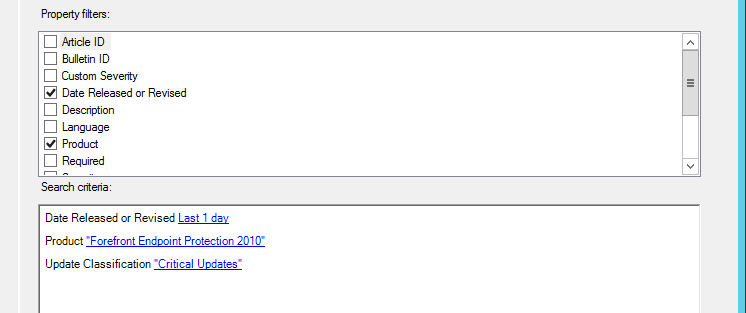
 Search Criteria : Update classification - Critical and Date revised
 Schedule           : Once in 30 days                                     


Definition Updates

Search Criteria : Definition updates for FEP / WIN Defeneder
Schedule           : Run the rule after any SUP synchronization


CAMP updates

Search Criteria : Critical updates for FEP
Schedule           : Once in a day


3. Multiple deployment in ADR

 In ConfigMgr 2012 we can have only one deployment for an ADR. If you want to differ in the deployment time or user notification etc.. for some clients, you actually need to create a new ADR.

But in vNext you don't have to create a new ADR. You can just keep on adding new deployments with different schedule, collection, user notification etc.. to an existing ADR. Cool isn't it ?.

The below screenshots illustrate how we can add multiple deployments for an ADR


With all these, there isn't a huge change in SUP model of Configmgr vNext yet, but there are things which can actually reduce some of the loads on the engineer..

Hope you enjoyed this !                                                                                               S A Delphin


Tuesday, September 15, 2015

What's New in ConfigMgr VNEXT - TP3 - Introduction

Hey Guys. I am happy to meet you all with another post, only this time it is gonna be a series of posts about "What's new in ConfigMgr Vnext - TP3"

As you all know that ConfigMgr vNext TP3 is made available by Microsoft on 19-Aug-2015 and I got a chance to evaluate the functionality in my LAB. This series of blog post will talk about the features and functionality introduced or changed in vNext. Hope you guys will enjoy this series.

New Features / Enhancements in ConfigMgr vNext

 The listed below are the improvements in vNext technical preview 3, collected from Technet.

  • Windows 10 in-place upgrade
  • Mobile Application Management
  • Data protection for mobile devices
  • Preferred management points
  • On-premises mobile device management (MDM)
  • Support for Microsoft Azure virtual machines
  • Client deployment status in console monitoring
  • Sideloading apps in Windows 10
  • Windows PE Peer Cache
  • On-premises MDM: Adds support for Windows 10 desktop
  • Bulk enrollment of Windows 10 devices
  • Support for multiple Automatic Deployment Rules
  • Diagnostics and Usage Data
  • Service a server cluster
  • Support for SQL Server AlwaysOn for highly available databases
  • Deploy Windows Business Store applications
  • App deployment to Windows 10 devices with on-premises MDM
  • Compliance settings for Windows 10
  • Improved workflow for creating mobile device configuration items
  • Updates for Windows 10 in-place upgrade
  • Updates for bulk enrollment of Windows 10 devices with on-premises MDM

I will be testing every possible scenario in my LAB and share my experience with you guys in upcoming articles.

The complete detail and limitations are available in this artcile
https://technet.microsoft.com/en-us/library/dn965439.aspx

ConfigMgr vNext TP3 can be downloaded from Microsoft evaluation center
http://www.microsoft.com/en-us/evalcenter/evaluate-system-center-configuration-manager-and-endpoint-protection-technical-preview

Outlook - ConfigMgr vNext TP3

As I just completed setting up my vNext LAB, i though it would be really cool to share the outlook of the tool with you guys.

Asset and compliance


The Asset and compliance looks the same as ConfigMgr 2012 R2 SP1 other than the "Windows" folder under All Corporate-Owned devices.

 Software Library


Windows sideloading keys is new which helps "Sideloading apps in Windows 10" We will be seeing that later in detail.

 Monitoring


Production and Pre-production client deployment. Not sure how this works yet, But we will get know very shortly.

Administration


I see a new node "Update and servicing" under cloud servicing. This is most probably related to the new windows service "Configuration_Manager_Update" which is available along with the other tradition ConfigMgr windows services.

Windows Services


Along with the traditional ConfigMgr windows services, there is a new Windows service with the name "Configuration_Manager_Update" is listed under services.msc. There is a log file associated with component as well, But i am not really sure about the functionality of this at the moment.


Client settings


There is this new client setting node "Windows PE peer cache" is added to support Windows PE Peer Cache feature. This is gonna be one of the coolest feature in ConfigMgr vNext since you don't need to install a Server DP in a remote location just for the sake of OSD. Excited to test this functionality.


Hope u enjoyed this :-)                                                                                                  TechyTipz


Wednesday, August 12, 2015

Failed to create AppDomain "CM_SMS.dbo - ConfigMgr 2012 R2 console error


Hey Guys. wanted to share a issue that i have encountered today with my ConfigMgr LAB environment. When i tried launching the ConfigMgr console in the LAB today I was gifted with the below error.


As soon i got this message i checked the SmsAdminUI.log and i could see the below log snippet

[6, PID:3960][08/12/2015 13:09:20] :Transport error; failed to connect, message: 'The SMS Provider reported an error.'\r\nMicrosoft.ConfigurationManagement.ManagementProvider.WqlQueryEngine.WqlQueryException\r\nThe SMS Provider reported an error.\r\n   at Microsoft.ConfigurationManagement.ManagementProvider.WqlQueryEngine.WqlQueryResultsObject.<GetEnumerator>d__0.MoveNext()
   at Microsoft.ConfigurationManagement.ManagementProvider.WqlQueryEngine.WqlConnectionManager.Connect(String configMgrServerPath)
   at Microsoft.ConfigurationManagement.AdminConsole.SmsSiteConnectionNode.GetConnectionManagerInstance(String connectionManagerInstance)\r\nConfigMgr Error Object:
    Description = "Can't create instance of CSecuredSource for SMS_Site";
    ErrorCode = 3250653696;
 As this suggests that the SMS provider is failing to execute a WMI query i quickly connected Root\SMS\Site_LAB and tried running SELECT * FROM SMS_Site WHERE SiteCode = 'LAB'

I have got the below error message


As this was misleading i went and checked smsprov.log to see if there is any error. and in the smsprov.log i could see the below snippet

CSspQueryForObject :: Execute...            SMS Provider     12.08.2015 10:36:24         5516 (0x158C)
***  select so.ObjectTypeID, so.ObjectTypeName, CASE dbo.fnIsSiteInMaintMode() WHEN 0 THEN so.AvailableOperations ELSE dbo.fnOR(oo.BitFlag) & so.AvailableOperations END  from dbo.RBAC_SecuredObjectTypes AS so  inner join dbo.RBAC_ObjectOperations AS oo ON oo.ObjectTypeID = so.ObjectTypeID  where oo.isReadOnly = 1 AND so.ObjectTypeName = 'SMS_Site' group by so.ObjectTypeID, so.ObjectTypeName, so.AvailableOperations     SMS Provider     12.08.2015 10:36:24         5516 (0x158C)
*** [42000][6517][Microsoft][SQL Server Native Client 11.0][SQL Server]Failed to create AppDomain "CM_LAB.dbo[runtime].822". ~~Exception has been thrown by the target of an invocation.        SMS Provider                12.08.2015 10:36:24         5516 (0x158C)
*~*~[42000][6517][Microsoft][SQL Server Native Client 11.0][SQL Server]Failed to create AppDomain "CM_LAB.dbo[runtime].822". ~~Exception has been thrown by the target of an invocation.     ThreadID : 5516 , DbError: 6517 , Sev: 16~*~*        SMS Provider     12.08.2015 10:36:24         5516 (0x158C)
CSecuritySource::GetSecurityObjectEx - SQL cmd failed SMS Provider     12.08.2015 10:36:24         5516 (0x158C)
*~*~e:\nts_sccm_release\sms\siteserver\sdk_provider\smsprov\sspobjectquery.cpp(2057) : Can't create instance of CSecuredSource for SMS_Site~           SQL Error: [42000][6517][Microsoft][SQL Server Native Client 11.0][SQL Server]Failed to create AppDomain "CM_LAB.dbo[runtime].822". ~~Exception has been thrown by the target of an invocation.~*~*               SMS Provider     12.08.2015 10:36:24         5516 (0x158C)
*~*~Can't create instance of CSecuredSource for SMS_Site [42000][6517][Microsoft][SQL Server Native Client 11.0][SQL Server]Failed to create AppDomain "CM_LAB.dbo[runtime].822". ~~Exception has been thrown by the target of an invocation.~*~*      SMS Provider     12.08.2015 10:36:24         5516 (0x158C)
Execute WQL  =SELECT * FROM SMS_Site WHERE SiteCode = 'LAB'           SMS Provider     12.08.2015 10:36:24         5516 (0x158C)
 This finally gave me some convincing evidence that there is some problem with the SQL instance.

 As a first step I restarted the SQL instance (Would not be the first for most of us ) and voila the console started showing me the Asset and compliance workspace. And that saved my day.

Bottom line, to me restarted the SQL instance worked.

Hope this helps ..

                                                                                                                                S A Delphin

Monday, June 1, 2015

ConfigMgr 2012 Application Creator v1.0 - PowerShell tool


Hello Guys

It feels good to write a post aster a quite a long time. Recently i have been learning PowerShell and created a new tool to create a ConfigMgr application on your command. I am gonna stop the useless talks right here and walk you through the tool.

ConfigMgr App Creator V 1.0


             ConfigMgr App Creator is a wrapper tool for ConfigMgr 2012 which can be used to create ConfigMgr application, Dt and deployment on the go without even lanching the ConfigMgr console and going through a lenghthy object creation wizards.
            This tool will be really helpful for the packaging team who tends to take control over the application packaging  as well as application delivery to the deployment tool.


Pre-Requisites


The following applications must be present in the computer on which the tool is launched.

  1. ConfigMgr 2012 R2 console
  2. net framework
  3. PowerShell 3.0 or higher

Look Of the Tool

Site Code: Module which connects the tool with the ConfigMgr WMI provider and import required PowerShell modules.

Expected Values / Action = the user is expected to enter the 3 dig ConfigMgr site code and client on connect

 Installer File: Module with a browse button to browser and select the *.vbs or *.msi installer.

Expected Value / Action = the user is expected to click on the browse button to select the installer file, and the complete file path will be populated in the text field.

 Application Name : name of the application that needs to be created within ConfigMgr

Expected Value / Action: the User is expected to give name of the application. If the installer is a MSI this filed will be automatically be populated from the MSI property.

Publisher: Publisher of the application that needs to be created within ConfigMgr

Expected Value / Action: the User is expected to give publisher of the application. If the installer is a MSI this filed will be automatically be populated from the MSI property.

Version: version of the application that needs to be created within ConfigMgr

Expected Value / Action: the User is expected to provide the version of the application. If the installer is a MSI this filed will be automatically be populated from the MSI property.

Installation Program: Installation command line of the DT to be created for the created Application within ConfigMgr

Expected Value / Action: This filed will be automatically populated based on the installer file that the user selects. This can be edited.

 Uninstallation Program: Uninstallation command line of the DT to be created for the created Application within ConfigMgr

Expected Value / Action: This filed will be automatically populated based on the installer file that the user selects. This can be edited.

Content Source Path: Content source of the application to be created within ConfigMgr

Expected Value / Action: This filed will be automatically populated based on the installer file that the user selects. This can be edited.

 Installation Collection Name: Name of the collection to be created within ConfigMgr

Expected Value / Action: This filed will be automatically populated based on the installer file that the user selects. This can be edited.

Deployment Name: Name of the Deployment to be created within ConfigMgr

Expected Value / Action: This filed will be automatically populated based on the installer file that the user selects. This can be edited.

Target: to specify whether the collection is going to be a user based or Device based.

Expected Value / Action: By default the “Device” radio button will be selected. This can be changed.

Purpose: Purpose of the deployment to be created.

Expected Value / Action: By default the “required” radio button will be selected. This can be changed.

Create Collection / Deployment: The check boxes can be used to select if collection or deployment should be created.

Expected Value / Action: On successful connection to the ConfigMgr site both this check boxes will be checked. This can be changed.

 Read: This button validates if all the fields are correctly populated. If any of the field is not populated, this will populate it with default values. On successful validation this will enable the create button.

Expected Value / Action: The user is expected to click and validate the fields before clicking on create button.

Create: This button triggers the script execution of creating application in ConfigMgr. This will be enabled only after the successful validation.

Expected Value / Action: The user is expected to click this button after validating the fields.

Log Field: the status of each and every step that the script performs will be recorded here.

Expected Value / Action: The user is expected to observe this field to verify the successful creation of the application.

Author / Website: Information field

Version: Information filed

Link to Download the Tool

Download Link

TechyTipz

Twitter Delicious Facebook Digg Stumbleupon Favorites More

 
Design by Free WordPress Themes | Bloggerized by Lasantha - Premium Blogger Themes | Bluehost Coupons