Tuesday, February 7, 2012

"the service did not respond to the start or control request in a timely fashion" Windows deployement services (WDS)

  This is the message i get when i'm configuring windows deployement services in a IBM x3650 M3 server with Xeon processor.
   Initially i thought that it would be a issue with network configuration, share permission and stuffs like that...


But even after checking all the possiblities the server gave me the same message. Then i went to event viewer for further digging. In Event viewer out of my luck no further information except the below.


  It was giving me event id 257 repeatedly with a message "An error occured while trying to start windows deployment service"  and that's it.. I ran out of ideas.

  A research (googling) taught me that the wds service is not capable of handling more that 20 logical processors assigned to host server. OMG.. Then i checked my server's specs, it has 6*4=24 logical processors. Damn!..

  From elevated command prompt i ran the below command, to set the maximum logical processor as 20 in that server as a test.

bcdedit /set {current} numproc 20

and restarted my computer.

  Voila, After a restart my wds started working as expected. But i cant use all my resources.

  Expecting an update from microsoft to address this issue.

if you want to revert back youu can run the below command in elevated command prompt.

bcdedit /deletevalue {current} numproc

Hope this helps...
                                                                                                                                    Techytipz

Saturday, October 15, 2011

command line to use acldiag.exe/How to take a report on Active Directory (AD) delegation permissions per OU/Site/Group/object.


   Microsoft provides a free command line utility called acldiag.exe to by which we can generate a report like log based on the permissions and delegation assigned to Ou's/groups/objects in active directory.


  we ca even give input from a text file if you need to take report on multiple Ou's. The text file must contains Ou names.

   let's see that ...

here we will see an example code to take permission report for multiple Ou's in a domain. the names of the OU's will be given to batch file through a text file.

Download support tools from http://www.microsoft.com/download and install it in your computer.

for /f %%a in (c:\users\delphin\desktop\list.txt) do (
acldiag "ou=%%a,dc=domain,dc=com" >>c:\users\delphin\desktop\log.txt
)


Copy the above code and paste it into a notepad file, replace "domain" with your domain name, replace "c:\users\delphin\desktop\list.txt" with the text file containing the list of OUs in your domain.

Replace "c:\users\delphin\desktop\log.txt" with the location where you want the log file to be saved. And rename it to adreport.bat.

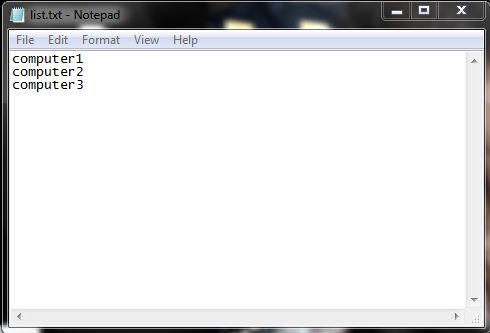
The file list.txt must contain the list of the name of the OU's, as one OU name in a line.


The log.txt will contain the details as in the following screenshot.


Hope this helps..
                                                                                                                                           Techytips

Friday, October 14, 2011

Run psexec.exe for list of computers stored in text file | batch file to ping a list of computers in a text file | Give input to command prompt from a text file


  Psiexec.exe is a nice, handy command line utility given by Microsoft through which we can run batch commands remotely to remote computer.

  Consider a situation when you need to run a specific or a set commands to multiple no of computers remotely from your computer across your LAN.

  This script described in this post will fetch computer names from a text file and run commands remotely with psiexec.exe command line utility...

 Let's say that you need to renew ip address in many computers across your LAN,

First thing you need to do is to download ps tools from http://technet.microsoft.com , extract the zip file and past all the files to c:\windows\syste32\ folder.

Then copy the below command lines and paste to a text file. rename it to ipenew.cmd

for /f %%a in (c:\users\delphin\desktop\list.txt) do (
psexec \\%%a ipconfig /renew
)

replace "delphin" with your login profile, make a text file with list of computer names or ip address (one computer name in a line)


That's it. Double click the iprenew.cmd file to run it from your computer. That will take the computers names from the text file and will run the ipconfig /renew command in each of those computers.


Hope this helps..
                                                                                                                                   Techytips

Thursday, October 13, 2011

C++ example program to write contents to a text file.


  Below is the simple c++ example program, to read contents from a text file stored in your computer's hard drive...


#include<iostream.h>
#include<fstream.h>
void main()
{
 char *name;
 int num;
 ofstream fileout;
 fileout.open("d:\\cpp\\pgm\\a.txt");
 cout<<"Enter the name"<<endl;
 cin>>name;
 cout<<"Enter number"<<endl;
 cin>>num;
 fileout<<name<<endl;
 fileout<<num<<endl;
 fileout.close();
}


Hope this helps..

                                                                                                                                        Techytips

C++ example program to read contents from a text file.


  Below is the simple c++ example program, to read contents from a text file stored in your computer's hard drive...


#include<iostream.h>
#include<fstream.h>
void main()
{
 char *name;
 int num;
 ifstream filein;
 filein.open("d:\\cpp\\pgm\\a.txt");
 filein>>name;
 filein>>num;
 cout<<name<<endl;
 cout<<num<<endl;
 filein.close();
}


Hope this helps..

                                                                                                                                          Techytips

Wednesday, October 12, 2011

backup all your photos and videos and status updates and comments uploaded in facebook.


  Are you those guys who spends most of the time on Facebook and upload loads of your photos and videos to it??

  Then you must read this article. Facebook offers us to backup the items we uploaded to Facebook. There simple steps to do that.


 Let see those steps...


Step 1

           login to your Facebook account, Click on the down arrow next to HOME button and select account settings


In account settings click on download a copy of your Facebook data.


In the next window click on Start my archive..


Then Facebook will start to archive your data. you need to wait for some time, once the archiving completed Facebook will send you an email with download link for your archive.


 Step 2

            Once you receive the email from Facebook click on the link to download your archive. it will ask you retype your Facebook password.. Type the password and the download will be started.


After the download completed, open the index.html inside the archive and check all the informations downloaded completely.

Hope this helps..

                                                                                                                                        Techytips

Monday, October 10, 2011

C++ example program to sort a string.

This program can be used to sort a string...


/* String sorting */

#include<iostream.h>
#include<string.h>
#include<process.h>
#include<conio.h>
#define NULL 0
class string
{
 private:
  char str[100][100];
 public:
  void getstring(int);
  void display(int);
  void sortstr(int);
};
void string::getstring(int n)
{
 char temp[100];
 for(int i=0;i<n;i++)
 {
  cout<<"Enter the String"<<endl;
  cin>>temp;
  strcpy(str[i],temp);
 }

}

void string::display(int n)
{
 for(int i=0;i<n;i++)
 {
  cout<<endl<<"String "<<i+1 << ":" << str[i];
 }

}
void string::sortstr(int n)
{
 char temp[100];
 for(int i=0;i<n;i++)
 {
  for(int j=i+1;j<n;j++)
  {
   if(strcmp(str[i],str[j]) > 0 )
   {
    strcpy(temp,str[i]);
    strcpy(str[i],str[j]);
    strcpy(str[j],temp);
   }
  }
 }
}
void main()
{
 string strobj;
 clrscr();
 int nstr;
 cout<<"How many String to work"<<endl;
 cin>>nstr;
 strobj.getstring(nstr);
 strobj.sortstr(nstr);
 strobj.display(nstr);

}

Hope this helps..

                                                                                                                                         Techytips

C++ example program to perform string related operations like string copy, string compare, string merge, upper and lower..


  In this example, various string operations like string copy, string compare, string merge, string uppercase, string lower case.
 
  Each operation is explained using separate function.

  Copy and paste the below code in a text file, and rename it as filename.cpp...

#include<iostream.h>
#include<ctype.h>
#include<string.h>
#include<conio.h>
class strhandle
{
 private:
  char str[100];
 public:
  strhandle();
  void get_str();
  void strcopy();
  void strmerge(char[]);
  void strcompare(char[],char[]);
  void struppercase();
  void strlowercase();
};
strhandle::strhandle()
{
 str[0]='\0';
}
void strhandle::get_str()
{
 cout<<"Enter the String to copy"<<endl;
 cin>>str;
}
void strhandle::strcopy()
{
 char *s1;
 strcpy(s1,str);
 cout<<"Copied string="<<s1<<endl;
}
void strhandle::strmerge(char *s2)
{
 cout<<"After merge:"<<strcat(str,s2)<<endl;
}
void strhandle::strcompare(char *s3, char *s4)
{
 int i;
 i=strcmp(s3,s4);
 if(i > 0)
 {
  cout<<"String "<<s3 << "is bigger than" << s4<<endl;
 }
 else if(i < 0)
 {
  cout<<"String "<<s3 << "is smaller than" << s4<<endl;
 }
 else
 {
  cout<<"Both string are equal"<<endl;
 }
}
void strhandle::struppercase()
{
 cout<<"Uppercase"<<endl;
 for(int i=0;i<strlen(str) ;i++)
 {
  cout<<(char)toupper(str[i]);
 }
 str[0]='\0';
 cout<<endl;
}
void main()
{
 clrscr();
 strhandle strobj;
 strobj.get_str();
 strobj.strcopy();
 char *str1;
 char *str2;
 char *str3;
 str1[0]='\0';
 str2[0]='\0';
 str3[0]='\0';
 cout<<"Enter the string to merge"<<endl;
 cin>>str2;
 strobj.strmerge(str2);
 str2[0]='\0';
 cout<<"Enter the first string to compare"<<endl;
 cin>>str2;
 cout<<"Enter the second string to compare"<<endl;
 cin>>str3;
 strobj.strcompare(str2,str3);
 str2[0]='\0';
 str3[0]='\0';
 strobj.struppercase();
 getch();
}

Hope this helps..
                                                                                                                                                                                  
                                                                                                                                    Techytips             

C++ example program to sort the the array of elements.


  In this example, the algorithm to sort an array of elements is explained.

  This program will compare the adjacent elements in a array and swap based on the result.

  Copy and paste the below code in a text file, and rename it as filename.cpp ...

/* program to Sort the Array*/
#include<iostream.h>
#include<conio.h>
class sort
{
 private:
  int arr[100];
  int val;
 public:
  void sortarr();
};
void sort::sortarr()
{
 printf("How many values"<<endl;
 cin>>val;
 printf("Enter the Values"<<endl;
 for(int i=0;i<val;i++)
 {
  cin>>arr[i];
 }
 for(int i=0;i<val;i++)
 {
  for(int j=i+1;j<val;j++)
  {
   if(arr[i] > arr[j])
   {
    int temp=arr[i];
    arr[i]=arr[j];
    arr[j]=temp;
   }
  }
 }
 printf("Sorted Elements"<<endl;
 for(int i=0;i<val;i++)
 {
  cout<<arr[i]<<endl;
 }
}
void main()
{
 sort sortobj;
 clrscr();
 sortobj.sortarr();
 getch();
}

Hope this helps...

                                                                                                                                          Techytips

C++ example program to understand constructor and inheritance of objects.


  This post contains the c++ example code to understand constructors and inheritance...


#include<iostream.h>
#include<conio.h>
class B
{
};
class D:public B
{
 public:
  void msg()
  {
   cout<<"No constructors in base class and derived class"<<endl;
  }

};
void main()
{
 D objd;
 clrscr();
 objd.msg();
 getch();
}

Hope this helps.

                                                                                                                                     Techytips

C++ example program to perform arithmetic operations like addition, subtraction, multiplication and division.


   This post contains the c++ example code for performing arithmetic operations.

   In this example, each arithmetic function is explained using separate functions.

   Copy and paste the below code in a text file, and rename it are filename.cpp ...

/* program to perform arithmetic operations*/
#include<iostream.h>
#include<process.h>
#include<conio.h>
class Arith
{
    private:
        int x,y;
    public:
        int add();
        int sub();
        int mul();
        int div();
};
int Arith::add()
{
    cout<<"Enter the x value"<<endl;
    cin>>x;
    cout<<"Enter the y value"<<endl;
    cin>>y;
    return(x+y);
}
int Arith::sub()
{
    cout<<"Enter the x value"<<endl;
    cin>>x;
    cout<<"Enter the y value"<<endl;
    cin>>y;
    return(x-y);
}
int Arith::mul()
{
    cout<<"Enter the x value"<<endl;
    cin>>x;
    cout<<"Enter the y value"<<endl;
    cin>>y;
    return(x*y);
}
int Arith::div()
{
    cout<<"Enter the x value"<<endl;
    cin>>x;
    cout<<"Enter the y value"<<endl;
    cin>>y;
    return(x/y);
}
main()
{
    Arith obj;
    char ch;
    clrscr();
    while(1)
    {
    cout<<"a:Addition"<<endl;
    cout<<"s:Subtraction"<<endl;
    cout<<"m:Multiply"<<endl;
    cout<<"d:Division"<<endl;
    cout<<"e:exit"<<endl;
    cout<<"Enter your Choice"<<endl;
    cin>>ch;
    switch(ch)
    {
        case 'a':
                int a=obj.add();
                cout<<"Addtion Result="<<a<<endl;
                break;
        case 's':
                int s=obj.sub();
                cout<<"Subtract Result="<<s<<endl;
                break;
        case 'm':
                int m=obj.mul();
                cout<<"Multiply Result="<<m<<endl;
                break;
        case 'd':
                int d=obj.div();
                cout<<"Division Result="<<d<<endl;
                break;
        case 'e':
                exit(0);
    }
    }
    getch();
} 

Hope this helps..
                                                                                                                                                               
                                                                                                                                     Techytips

Wednesday, September 28, 2011

Microsoft Visual C++ 2005 Redistributable (x86)/(x64) Failed - Installation aborted, Result=1619 While installing autodesk 2012 products


Some of my friends are started using Autodesk 2012 products and almost everybody came across the error stated as in the title. In Autodesk forums everybody suggested a clean install.

  But that will me most painful thing when they have other prior versions on Autodesk products.

  After a bit of research i was able to help them out without uninstalling previous versions of Autodesk products. sharing the solution  may help my blog readers...


For all of my friends the Autodesk 2012 products failed because the setup failed to install Microsoft Visual C++ 2005 Redistributable (x86)/(x64).  So i checked in installed programs to find the instances of Microsoft Visual C++ 2005 Redistributable (x86)/(x64) .

   surprisingly there were more that 6-7 instances of the Microsoft Visual C++ 2005/2008 Redistributable (x86)/(x64) . So i decided to uninstall all of them through control panel.

  Once i removed all the instances of Microsoft Visual C++ 2005/2008 Redistributable (x86)/(x64) ,I re-registered msiexec.exe through the below command line options in command prompt.

msiexec.exe -unreg
msiexec.exe -regserver

Restarted the computer and started the installation again, Voila!! Installation finished without any error or warning message. Hope this helps..

                                                                                                                                            Techytipz

Monday, September 19, 2011

Download Microsoft Windows 8 Developer Preview Build 8102 M3 32/64 bit


  Microsoft Windows 8 developer preview build 8102 32/64 bit is available for download from official Microsoft website.

  Windows 8 is not only the next version of Microsoft's familiar desktop interface, but is also the company's answer to the challenge of tablets too. That’s a difficult pair of challenges to straddle and not everything about the new interface is a success. This is also definitely pre-beta software that needs more development work, but we expected that...


  The good news for businesses is that Windows 8 is still a fully-capable desktop operating system with full compatibility and even more security, visualization and remote access options, but with the touchscreen support so many users want. Most users shouldn’t need a new PC to run it, though they may well want a new one for touch. For some workers, iPads and Android tablets can’t replace a PC; with Windows 8 Microsoft could deliver an option that gives business users the best of both worlds. Read more from the original article

  The Microsoft Windows 8 Developer Preview Build 8102 M3 32/64 bit can be downloaded from the below links available.

Download 32 bit version of Microsoft Windows 8 Developer Preview Build 8102 in iso format


 Download 64 bit version of Microsoft Windows 8 Developer Preview Build 8102 in iso format
                                                                                                                                                            
 Hope you will enjoy this post. windows 8 review will be available soon..


                                                                                                                                        Techytipz

Twitter Delicious Facebook Digg Stumbleupon Favorites More

 
Design by Free WordPress Themes | Bloggerized by Lasantha - Premium Blogger Themes | Bluehost Coupons